Posts mit dem Label app updates werden angezeigt. Alle Posts anzeigen

Freitag, 2. Januar 2015

aGif Watchface 1.3

Version 1.3 of aGif Watchface has been released!


Using this free app you can easily use any gif animation as an android watchface. If you do not know about this app yet, check this post about adding a gif animation as an android watchface.


New features in 1.3:

- You can now change the watchface type to analog, sweeping analog, digital and even no watchfach (this mode will only display the gif animation).

android watchface gif
Watchface Style selection

- Cleaned the UI and added a button to quickly open the google wearable companion app

android watchface
The new cleaned UI for agif Watchface

- You can customize the watchface color (ticks etc). ATM only one color can be set, but this will be more customizable in the next update
android watchface color
Select the color for your watchface


Examples of analog, digital and none watchface:
android watchface analog
Analog Watchface Style

android digital watchface
Digital Watchface Style

android watchface none
None Watchface Style


More examples of this app can be seen in article gif animations for android wearable,

Dienstag, 23. Dezember 2014

Fefes Newsreader jetzt mit besserer Android Wear Unterstützung

Vor ein paar Tagen habe ich mir eine LG G Watch gekauft. Das Gerät ist an sich ziemlich hässlich, aber android-wearable wollte ich schon immer ausprobieren. Insgesamt muss ich sagen, dass diese smartwatches praktischer sind als ich gedacht hätte!

Aber nun zu Fefes Newsreader für Android. Ich habe die Benachrichtigungen überarbeitet. Wenn nun mehr als eine neue Nachricht eingetroffen ist, so wird in der Benachrichtigung die Anzahl der News und von jeder Nachricht die Kopfzeile angezeigt.

fefe newsreader
Die neue Benachrichtigung von Fefes Newsreader

Falls ihr auch schon eine neue Android Smartwatch besitzt, so könnt ihr Fefes News nun komplett auf der Uhr lesen! Auf der Smartwatch werden nicht nur die Kopfzeilen der neuen Nachrichten angezeigt, sondern alle Nachrichten. Ein Wisch nach rechts oder links und ihr könnt die nächste Nachricht lesen.


Hier die Screenshots wie das ganze mit einer Benachrichtigung auf meiner LG G Watch aussieht:

fefe smartwatch
Fefe News auf der Smartwatch

fefe smartwatch
Die gleiche Nachricht zum scrollen

fefe smartwatch
Neue Nachrichten von fefe eingetroffen

fefe smartwatch
Ansicht der Nachrichten

fefe smartwatch
Nach unten gescrollte Nachricht


Zusätzlich dazu wurde auch das Verhalten der Alarms im Hintergrund zum Update geändert. Dieses hat sich leider beim API-update etwas geändert. Seit API 19 muss man nun setExact(...) setzen, damit der Alarm vom AlarmManager auch wirklich um diese Uhrzeit ausgeführt wird...


Mittwoch, 17. September 2014

Doppel Update für Fefes Newsreader

Falls euer Android Gerät heute kurz nacheinander zwei updates für Fefes Newsreader installiert hat, wundert euch nicht. Ein kleiner Bug hat sich durchgeschummelt und ist erst nach dem release aufgefallen ;)
Zudem gibt es nun hier eine Sammlung aller Fefe Newsreader relevanten Postings.
fefe rss widget
Das neue Android RSS Widget für Fefes Blog


Dienstag, 9. September 2014

Ein Widget für Fefe Newsreader für Android

Update für Fefes Newsreader


Die neue Version ist zwar noch nicht im Play Store, weil ich sie noch etwas testen muss, aber heute oder morgen ist es soweit.Es gibt zwei neue Funktionen für Fefes Newsreader.
Zum einen ist es nun einfacher zwischen App und Browser zu wechseln. Klickt ihr auf einen Link, öffnet dadurch den Browser und geht danach wieder zur Fefe Newsreader App, so bleibt die Newsliste bei der aktuellen Position stehen an der ihr gleich weiter lesen könnt.

Ein RSS Widget

Eine neue Funktionalität ist das neue Widget für den Newsreader. Mit diesem habt ihr die neusten News von Fefe auf einem Smartphone, ohne die App öffnen zu müssen. Das Widget zeigt euch genau wie die App die letzten Einträge an. Diese könnt ihr scrollen und durch klick auf einen Beitrag diesen direkt in der App öffnen!
fefe newsreader widget
Widget für Fefes Newsreader

Ein Widget unter android hinzuzufügen ist nicht schwer. Dieses Video verdeutlicht euch, wie das geht. Je nach Android Version sieht das Interface allerdings etwas anders aus. Das Video stammt von meiner App Battery Temperature Guard, welche ebenfalls kostenlos im Play Store verfügbar ist.

Freitag, 29. August 2014

Some uplifting reviews for my apps

So from time to time I login to the play store to read some reviews about my apps Battery Temperature Guard or my Baby Names App. It is fun to read the reviews and get some good feedback. I even get new ideas for features sometimes.

I just wanted to share some reviews which where really uplifting.

Best battery monitor I have tested many battery temp monitor apps but this is the best. The graphs are great and the alerts that are based on a certain temp that you specify will even alert you if your device has been silenced (if you choose). The developer is super response and a pleasure to work with if necessary. Just a great app for what it was intended to do.

A must have By phone gamers like me.... Plays a alarm ( or vibrates ) when your specified overtemp is reached. Now i know when to let it cool down (or not if i want to finish game and use more battery quickly). Very low memory usage too. Can even watch battery cool down in "live view". 

Just what I needed! Simple, low on resourses, showing battery temperature in status bar! Great! 

 La recomiendo.100% Buenísima app. de temp. del cel. Tu escojés los parametros de temp. Tiene alarma muy bueno para avisar , y mucho mas. Si le das mucha flama al cel. Esta es tu mejor opción . Lo mejor , "es gratis". Muchas gracias por tan excelente app.

5 Sterne - absolut verdient, denn jetzt gefällt mir die App zu 100% ! Und wenn Wünsche und Anregungen ernst genommen und umgesetzt werden, lässt man sich noch leichter zu einer positiven Bewertung hinreißen. Echt super ! 

Ez rohadt jó! GRAT! Hogy eddig ez senkinek nem jutott eszébe, és látszik hogy a fejlesztő tényleg hasznos alkalmazást akart csinálni, nincs hozzáférése az app nek pl mikrofon galéria fiókok stb mint a többi gyanús gagyi szarnak. Inkább ki adok érte pénzt de lássam hogy a fejlesztő korrekt és foglalkozik az általa ki adott termékkel épp úgy mint itt! Thanks! 


Does what it says on tin Great app, works with all my devices, helps it keep cool when the devices get hot, also love the high and low temp history reading! Everyone download this app now!!! :) 

Donnerstag, 28. August 2014

Android Name meaning & babynames app

While I am working on an update for Battery Temperature Guard I created an update for my android name meaning app. The app has now a new cool feature. I also created a new android app promotion video for this app. I also fixed some layout bugs on tablet devices.

You can now filter the names by name origin! The promotion video will explain you how you can use this cool feature.


Names can be filtered by name origin:
  • asian
  • arabic
  • catholic
  • hebrew
  • germanic
  • persian
  • scandinavic
  • and greek


android name meaning
Android baby names app

Donnerstag, 14. August 2014

How to create an android promotion video of your app

If you want to market your android app you have to create a cool promotion video for your app. You can link this video in the play store entry. This way more users will be attracted to your app. Creating such a promotion video is quite easy. All you need to have is some time and a few tools I will introduce to you.
I am not a professional promotion video creator, but I have already created a few videos for my app. Here is a small promotion video for my app Battery Temperature Guard for android. And this is a video for the temperature widget of the same app.

Screencast your android app

The first step is to create some screencasts of your android app. This means you have to film what is happening on your screen. The best free tool to do this is SCR Screen Recorder Free. It is a great tool to simply create videos of your app. Check this article how to use SCR and gain root on your device. On the screenshot below you can see the SCR widget. By clicking the orange button, it will disappear and create a video of your screen.
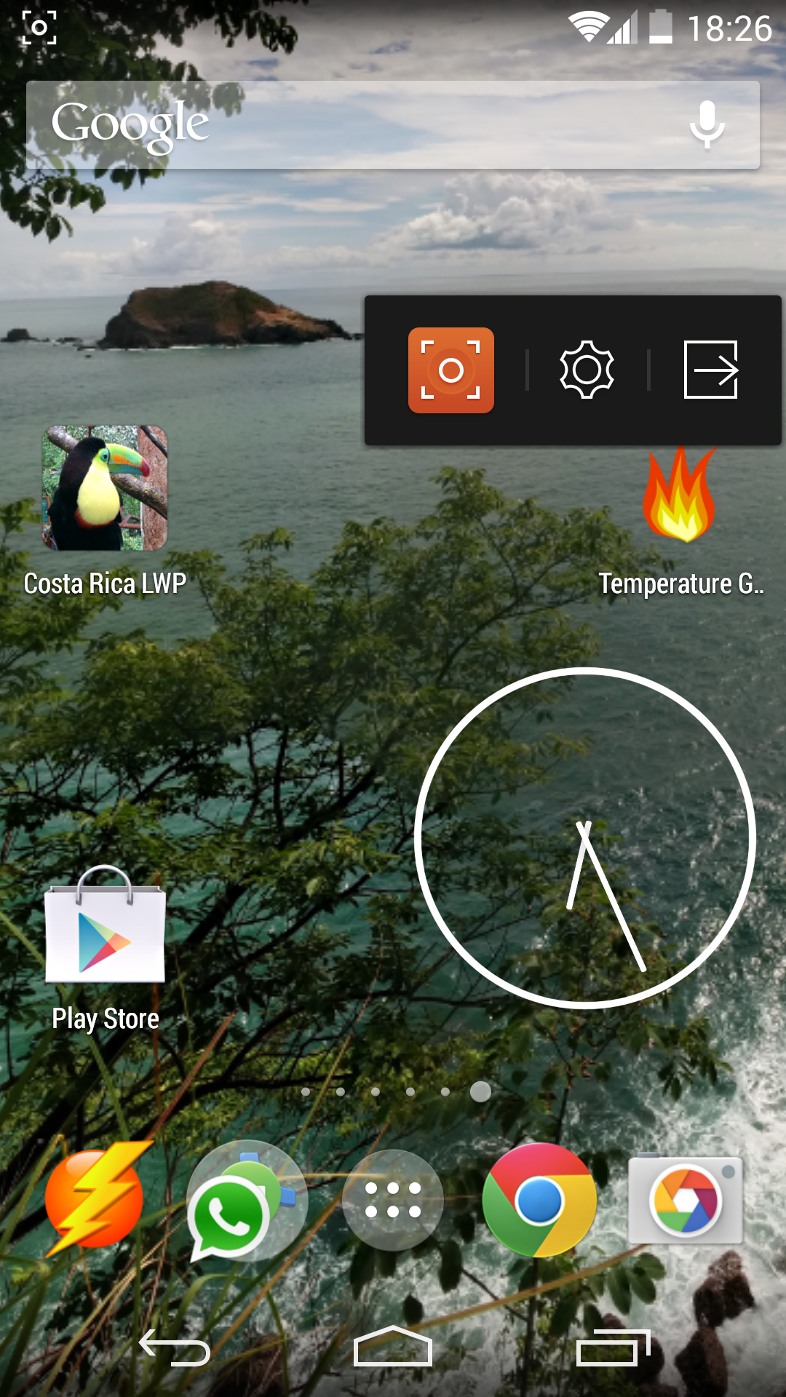
scr in action
The SCR widget is ready


Create your android promotion video

Now you have a bunch of videos you want to merge to a cool promotion video. I would recommend you to use the Microsoft Movie Maker. It is a simple tool to create/cut/annotate videos and images.
To use your screencast video inside the Movie Maker, you have to convert it using Free Video Converter. This tool is free. Add your video to the list and set the settings according to my screenshot below. Hit "convert" to convert the videos and wait a little bit.
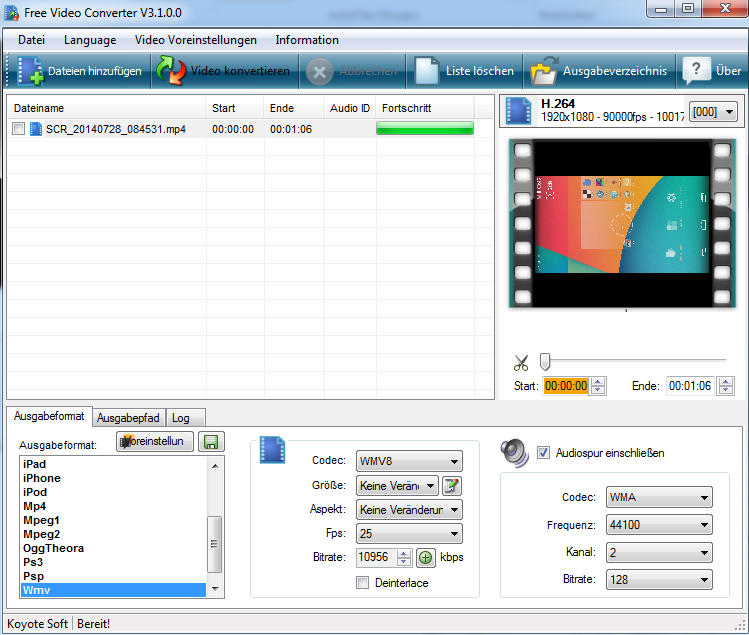
converting to movie maker
Converting the screencast videos

Now start the Movie Maker and drop the converted video into the app. It will take some time for Movie Maker to read the video. Here you can see a screenshot of me creating a video on how to configure the widget textsize of my app battery temperature guard.
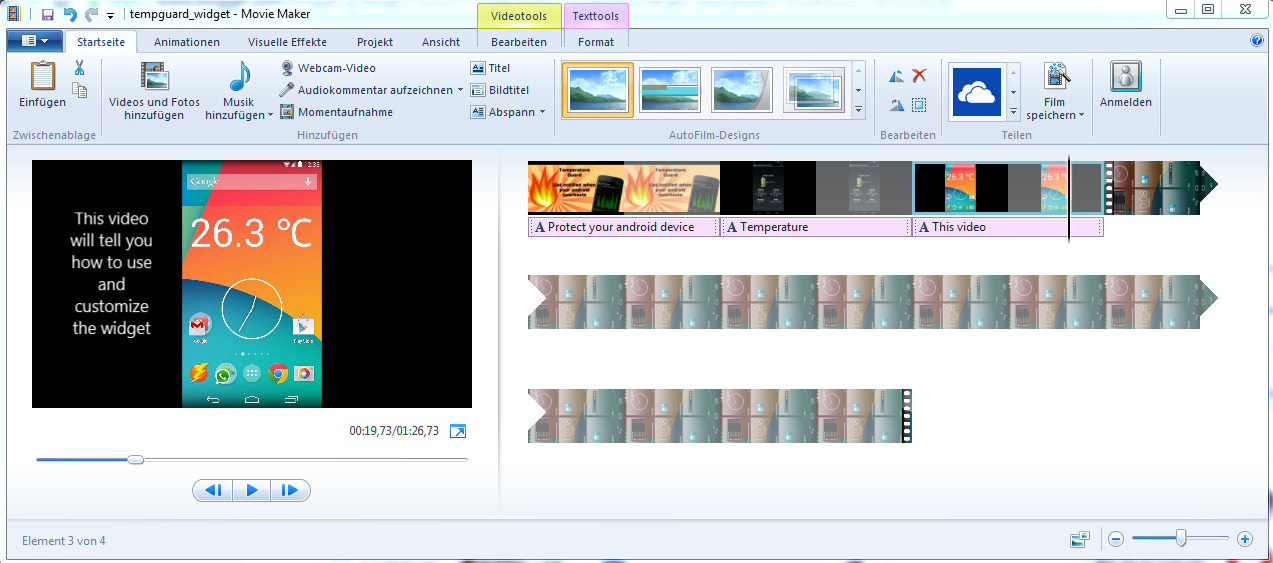
movie maker android promotion video
Loading the promotion video

You will notice, that the video is rotated and not as you want it to be. To change the rotation of the current selected video, tap on the small icon I have marked on this screenshot.
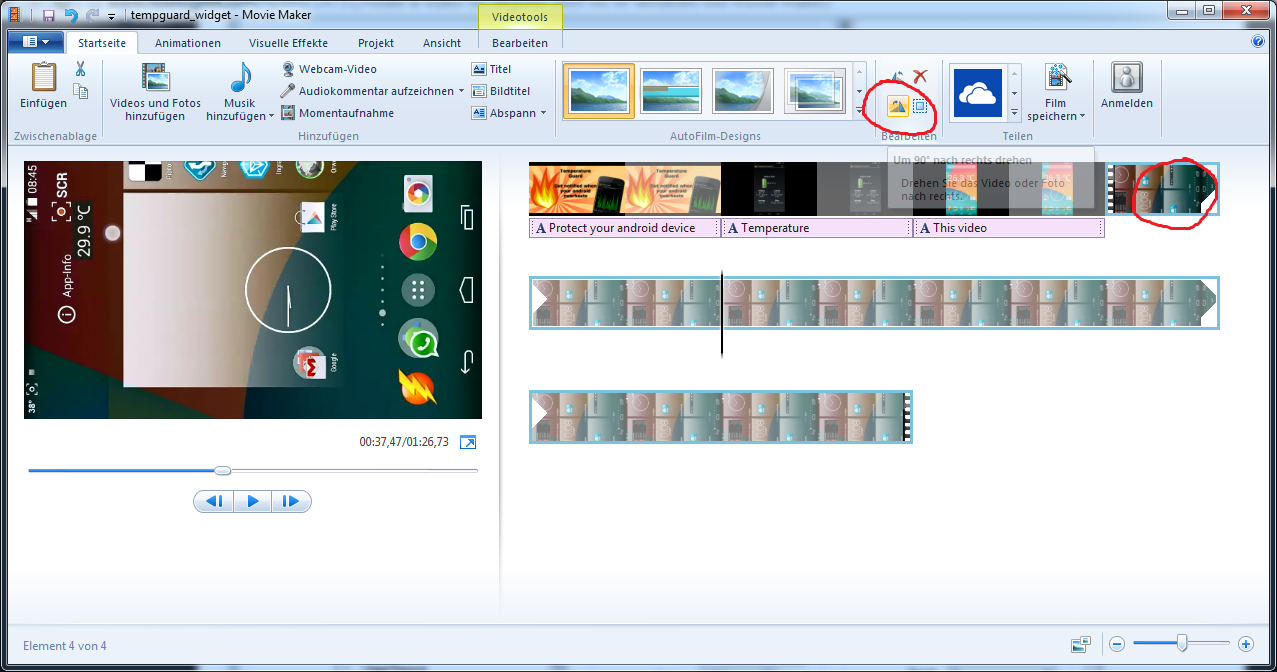
movie maker rotate video
Fixing the rotated video is simple

Customize your promotion video

Now you can start to edit your video. Add some text annotations, cut the video, slow some parts down, add some music and many many more. When you are done, you can export the video. I prefer full hd quality :)
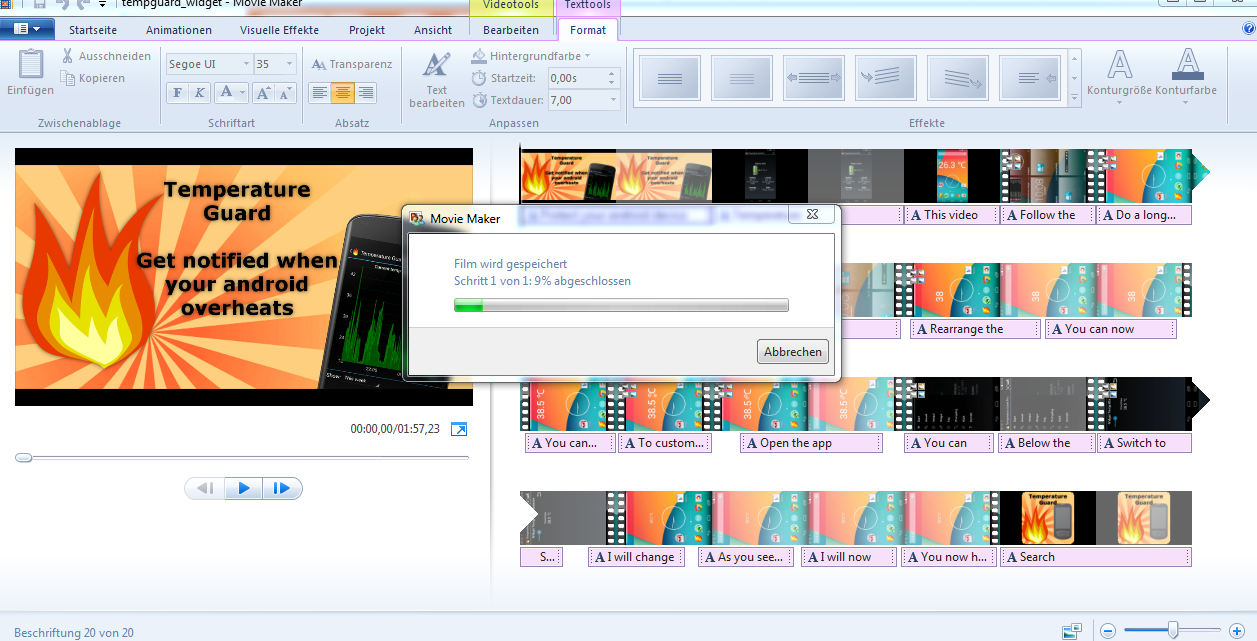
movie maker export
Exporting the Android Promotion Video

Upload your android promotion video to youtube and add some cool music

Cool music will make your video appear cooler. Inside youtube you can add free music to your video. Click through some songs to find something smooth for your promotion video.

After you uploaded and modified the video, you can add it to your blog like this:

Donnerstag, 24. April 2014

Überarbeitete Version von Fefes Newsreader für Android

 Android Newsreader für Fefes Blog 1.4

fefe newsreader hell
Fefe Newsreader im hellen Design
Wie in meinem letzten Post angekündigt, habe ich die Newsreader App für Fefes Blog überarbeitet.
Die Liste der Neuerungen ist recht lang, deshalb erst zum wichtigsten Punkt.
Es gibt eine neue Permission:

  • com.android.vending.BILLING
Keine Sorge, diese App wird euch nichts kosten und auch werbefrei bleiben. Ihr könnt allerdings wenn ihr mich unterstützen wollt eine kleine Spende mittels In-App-Billing an mich ausrichten. 


Ihr habt die App noch gar nicht installiert? Dann schnell in den Google Play Store und installiert den Fefe Newsreader gratis!

Das Lesen der Beiträge funktioniert nun ohne Popup

Sobald ihr auf einen Beitrag geklickt habt, vergrössert sich das Element und der ganze Beitrag ist sichtbar. Zudem könnt ihr jetzt direkt verlinkte Quellen öffnen ohne zuerst auf Fefes Blog surfen zu müssen.

fefe newsreader
Die "normale" Ansicht
fefe newsreader android
Ein Beitrag ist ausgewählt,
Links sind anklickbar

Helles / Dunkles Theme

Da einige Nutzer danach gefragt haben, ist diese App nun in hellem und dunklem Theme verfügbar. Das Standardtheme für die App ist immer noch das dunkle Theme. Wenn ihr die App allerdings lieber hell haben wollt könnt ihr dies in den Einstellungen ändern. Die App startet sich danach im ausgewählten Theme neu.

fefe newsreader theme
Das Theme ist jetzt umschaltbar

Spenden

Falls ihr Lust habt könnt ihr mich mit einer kleinen Spende unterstützen und so motivieren diese App stetig zu verbessern.

android will code for food
Unterstützt einen Hobby Programmierer


Der Vollständigkeit halber hier der aktuelle Changelog:

  • Trotz in-app Käufe ist und bleibt diese App komplett kostenlos und werbefrei!
  • Das Lesen der Beiträge funktioniert nun ohne Popup.
  • Sobald ihr auf einen Beitrag geklickt habt, werden die links direkt sichtbar und anklickbar
  • In den Einstellungen könnt ihr zwischen Hellem und Dunklen Theme wechseln
  • Die Benachrichtigung könnt ihr nun auf einem Android Gerät ab API 11 durch herunterziehen vergrössern um die ganzen News zu lesen
  • Per In App Käufe könnt ihr mich mit einer Spende unterstützen


Mittwoch, 16. April 2014

Kurzer Ausfall des Fefe Newsreader

fefe newsreader
Android Newsreader für
Fefes Blog
Meine Newsreader App für Fefes Blog hatte heute einen kleinen Aussetzer. Aufgrund eines fehlerhaften XML verabschiedete sich die App bei jedem Update :)

Das gute an der Sache ist. Entweder hat Fefe sein XML gefixt oder das XML hat sich selbst gefixt :) Die App läuft wieder und benachrichtigt euch wenn Fefe etwas tolles postet.

Ich hab noch eine kleine Todo Liste an Features, die ich noch implementieren müsste. Es gibt auch einige kleine Bugs.
Sobald ich Zeit finde werde ich die App etwas überarbeiten und noch besser machen.


Sonntag, 29. September 2013

New Blog for Temperature Guard

battery temperature guard blog
A screenshot of the new blog theme

Temperature Guard Posts and news will now move to the new Battery Temperature Guard Blog.

The new blog will feature a cool design and a better user interface for mobile devices. It will also feature more information about battery temperature, monitoring and securing your phone. So stay tuned.


Mittwoch, 25. September 2013

Android App Temperature Guard now features Fahrenheit and Celsius Support

android temperatur warning
Temperature Guard Pro
available at the play store
Get Temperature Guard free
at the play store
Temperature Guard Version 1.3 has just been released in google play Store and Amazon App Store.

You can use Temperature Guard to monitor your android devices temperature. The newest version features some small ui improvements and the possibility to change your desired temperature scale from Celsius to Fahrenheit.


Get Temperature Guard free
at amazon app store
To change the temperature scale, click on the preferenes button on the upper right of the app. In the Preferences you can tap on Temperature Scale Celsius to choose another temperature scale. To Download the free app from amazon app store, follow this link: Temperature Guard at the amazon play store.


android temperature scale
Choose your desired temperature scale

Temperature Guard Pro

If you like this app you can buy the pro Version of Temperature Guard for a buck. The pro version does only differ from the free by not loading any ad banners. So if you don't like ads or would like to support a developer, get the pro version at google play or amazon app store.
Buy Temperature Guard Pro
 at amazon app store

Buy Temperature Guard Pro
at google play store


Donnerstag, 29. August 2013

Temperature Guard free available on amazon app store!

android battery temperature
Android temperature warning 

Android temperature warning

I am happy to announce, that my app "Temperature Guard" is now available for free through the amazon app store. This app will run as a background service and will notify you if your device temperature is getting too high. Of course you can also customize the temperature when you want to get notified, as well as the notification sound etc.

You can also just use this app to monitor your androids device temperature during the day, so you can try to keep the temperature low and keep your battery healthy.

Using this app might even prevent your android battery from exploding. Warning! The previous link contains images not suitable to android lovers.

If you want to know more about this app and how to get it from googles play store, check out this article.

Download Temperature Guard free from amazon app store

To download this app for free from the amazon app store click on the amazon app store screenshot or click on this link to download it.

If you like this app I would appreciate if you rate it and recommend it to your friends. Please don't rate this app down if you encounter any problems, just contact me and I will do my best to fix bugs and make it compatible with your android device.

android temperature warning
Temperature Guard on the amazon app store


Dienstag, 27. August 2013

Battery Temperature Guard Improved

battery temperature guard
Prevent your android from overheating

This app will help to prevent overheating of your android device. So if you have the problem, that your android device is getting too hot, use this app to notify you.


Improved performance and less battery usage!
The latest release of Battery Temperature Guard free and pro now features a new backend which is more stable and uses less battery then ever before!

android device is getting too hot
Dont worry this app is alsoavailable in english!

Bad Reviews on the play store

The first release of this app had a few nasty bugs and I got a lot of bad reviews. I tested the newest version of the app with AppThwack and the app now runs smooth on almost all devices. If you still have problems, please contact me before you rate this app bad. Thanks!


Improved Battery Usage

Check out these Screenshots from my Nexus 4. They show the power usage of all my apps. Battery Temperature Guard is not even visible!
android temperature too high
Battery Temperature Guard does
not drain your battery!
 As a deeper analysis I run WakeLockGuard for more then 13 hours. Basically this apps monitors how often an app wakes up your phone and drains your battery. Battery Temperature Guard does not have any effect on my battery usage. Cool!

battery temperature guard wake lock
Battery Temperature Guard only uses 4 sec in a 13 hour time period

If you don't have any Temperature Guard installed on your android device, download it now from the play store for free. In a few days this app will also be available von amazon app store.

Sonntag, 25. August 2013

Android Battery Temperature too high

Hey guys.
android temperature
I am currently working on an update for my android app "Battery Temperature Guard". If your android device will get too hot, it will notify you, so you can take action and bring it to a place to cool down.

The newest update features an tablet optimized version of the app and of course a few bug fixes. On some old android devices, the app keeps crashing and crashing, but now this shouldn't be a problem anymore :)

Additionally you can increase the healthiness of your battery using this app. To check out why and how, read this article.
Here is a screenshot of the current development version. The update will be published through google play in the next hours.

battery temperature guard
Monitor android device temperature

Donnerstag, 16. Mai 2013

Finding friends for Tapped out on Android

tapped out tools android


Even whacky day is over, I just published an update with a few bugfixes for Tapped Out Tools. I still play this game a lot even I almost finished building all available buildings and solved all quests.

The latest really cool feature for Tapped Out Tools on Android is the Community feature. With this feature you can quickly find new friends to share eggs and whack snakes :)

If you like this feature, go to the play store and download Tapped out Tools for free!
Drop me a line if you have problems or ideas for new features.

Below you can see two screenshots. The first is the community feature. To copy the name of a user, click the copy icon, select the username and add it inside Tapped Out.
tapped out tools find friendstapped out tools android


Dienstag, 7. Mai 2013

Pengle Walkthrough App for Android

pengle walkthrough android
I just released version 1.3 of the famous Pengle Walkthrough app for android.
This update fixes a few small bugs and adds a cool new feature.
It will now try to update the Walkthrough Fragment itself.

This way you will always be notified about the latest Pengle Walkthrough videos.
You can also customize the notification behaviour.
Download Pengle Walkthrough for android for free at the play store.